
If you have a Frigidaire Gallery Induction Cooktop, you already own one of the most advanced cooking appliances available today. But using it confidently can be confusing, especially if you’re new to induction cooking. This guide will help you get the best results, avoid common mistakes, and understand how your cooktop works. Whether you want faster boiling, safer kitchens, or precise temperature control, you’ll find clear steps and practical tips here.
How Induction Cooking Works
Induction cooktops use electromagnetic energy to heat pots and pans directly. Unlike gas or traditional electric stoves, induction doesn’t heat the cooktop itself. The heat is generated inside the cookware, making cooking quicker and safer. This technology also means the cooktop stays cooler to the touch, reducing burn risks.
For induction to work, you need magnetic cookware. Not all pots and pans are compatible. If a magnet sticks to the bottom of your pan, it will work on your Frigidaire Gallery Induction Cooktop.
Setting Up Your Frigidaire Gallery Induction Cooktop
Before you start cooking, make sure your cooktop is installed correctly and ready for use. Here are the main steps:
- Check the installation: The cooktop should be installed by a professional. It needs proper electrical wiring and a flat surface. If you’re unsure, review the Frigidaire installation manual.
- Clean the surface: Use a soft cloth and mild cleaner to remove dust or fingerprints. Avoid abrasive pads or harsh chemicals.
- Gather cookware: Only use induction-ready pans. Stainless steel and cast iron are usually fine. Aluminum, copper, and glass pans will not work unless they have a magnetic base.
If you’re unsure about your cookware, place a magnet underneath. If it sticks, you’re good to go.
Using The Controls: Understanding The Touch Panel
The Frigidaire Gallery Induction Cooktop uses a touch control panel. This is different from traditional knobs. Here’s how the main controls work:
- Power On/Off: Tap the power button to turn the cooktop on. When you finish, tap again to turn it off.
- Cooking Zones: Each circle on the glass marks a cooking zone. Choose the zone where you want to cook.
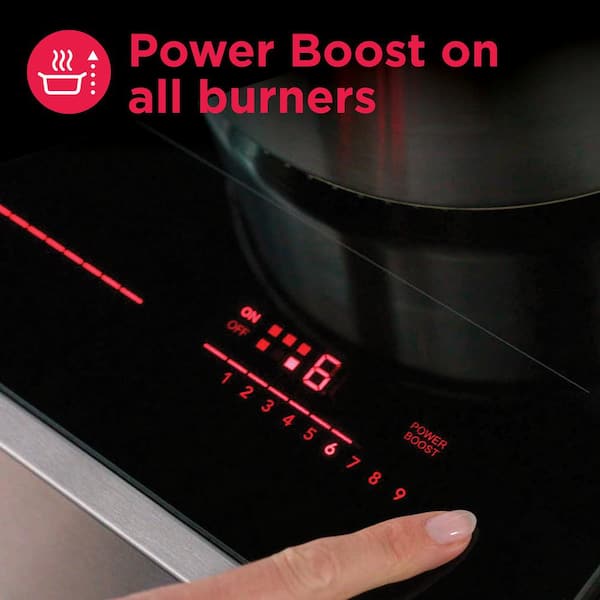
- Heat Levels: Adjust the heat by tapping the + or – symbols. Most models have levels from 1 (low) to 9 (high), plus a ‘Boost’ mode for extra power.
- Timer: Set a cooking timer by tapping the timer icon and choosing your zone and time.
- Lock Function: To prevent accidental changes, use the lock button. This is useful if you have children.
Example: Boiling Water
- Place a magnetic pot with water on a cooking zone.
- Tap the power button.
- Select the cooking zone.
- Increase the heat to 9 or use Boost for fastest boiling.
- When boiling, reduce heat if needed.
Tip: Induction boils water up to 50% faster than gas or electric stoves.
Cooking On Your Induction Cooktop
Starting Cooking
When you place a pan on the cooktop and turn it on, the cooktop senses the pan. If no pan is detected, it won’t heat up. This safety feature prevents accidents and saves energy.
Adjusting Heat
Induction gives you instant control. Changes in heat level happen within seconds. If you want to simmer, use lower settings (1–3). For frying, use medium to high (5–9).
Using Boost Mode
The Boost mode increases power for quick heating. This is ideal for boiling water or searing meat. It usually lasts for a few minutes, then goes back to normal.
Cooking Tips
- Always keep the pot centered on the cooking zone.
- Never use empty pans. Induction can heat them quickly, which may damage the pan.
- Avoid sliding pans across the glass; lift them to prevent scratches.
- Clean spills immediately, but wait until the surface cools.

Credit: franklincommunity.coop
Table: Induction Vs Gas Vs Electric Cooktops
Here’s a quick comparison to show why induction stands out:
| Feature | Induction | Gas | Electric |
|---|---|---|---|
| Heating Speed | Very Fast | Moderate | Slow |
| Energy Efficiency | Up to 90% | 40–55% | 65–70% |
| Safety | Cool Surface | Open Flame | Hot Coil/Glass |
| Precision | High | Medium | Low |
| Cleanliness | Easy | Hard | Moderate |
Common Functions And Features
The Frigidaire Gallery Induction Cooktop offers several features to improve your cooking experience:
- Automatic Pan Detection: The cooktop only heats when a compatible pan is present.
- Child Lock: Prevents accidental or unwanted use.
- Residual Heat Indicator: Shows if the surface is still hot after cooking.
- Keep Warm Function: Maintains food at serving temperature.
- Timer: Lets you time each cooking zone separately.
- Bridge Element: Some models let you combine two zones for large pans.
Table: Key Features Comparison
Here’s a look at different Frigidaire Gallery models and their main features.
| Model | Bridge Element | Timer | Child Lock | Boost Mode |
|---|---|---|---|---|
| FGIC3066TB | Yes | Yes | Yes | Yes |
| FGIC3666TB | Yes | Yes | Yes | Yes |
| FGIC3067TB | No | Yes | Yes | Yes |
Cleaning And Maintenance
Keeping your cooktop clean is important for both safety and performance. Here’s how to do it:
- After Each Use: Wipe the surface with a damp cloth. For tough stains, use a ceramic cooktop cleaner.
- Avoid Scratches: Don’t use steel wool or abrasive pads.
- Deep Cleaning: Occasionally, use a soft sponge and mild soap. Dry with a soft towel.
- Remove Burned Residue: Use a cooktop scraper, but never apply too much force.
- Check Vents: If your cooktop has venting, make sure it’s clear and clean.
Insight: Many new users forget that induction cooktops need less cleaning because spills don’t bake onto the surface as quickly. Still, cleaning right after use is easier and prevents stains.
Troubleshooting: Common Problems And Solutions
Even advanced appliances can have issues. Here are some typical problems and fixes:
- Cooktop won’t turn on
- Check that it’s plugged in and the breaker is on.
- Make sure you’re touching the correct power button.
- Cooktop doesn’t heat
- Confirm you’re using induction-compatible cookware.
- Pan must be centered on the cooking zone.
- Error codes
- Most models display codes for issues like overheating or sensor problems. Consult the manual for code meanings.
- Touch controls not responding
- Clean the control area. Moisture or dirt can block sensors.
- Unusual noises
- Light humming or clicking is normal. Loud sounds may mean cookware is not flat or not compatible.
Non-obvious insight: Some pans, even if magnetic, can cause strange sounds if their bottoms aren’t perfectly flat. Try a different pan if you hear buzzing.
Credit: www.homedepot.com
Cooking Examples And Practical Tips
Let’s look at how to cook popular dishes on your Frigidaire Gallery Induction Cooktop.
Stir-fry
- Use a flat-bottomed wok. Induction works best with full contact.
- Preheat on high (7–9) for 1–2 minutes.
- Add oil and ingredients. Stir quickly.
- Reduce heat to simmer when sauces thicken.
Pasta
- Fill a large pot with water.
- Use Boost mode for rapid boiling.
- Add pasta and salt.
- Stir occasionally and reduce heat to maintain a gentle boil.
Eggs
- Heat a nonstick pan at level 4–5.
- Add butter or oil.
- Cook eggs, adjusting heat as needed.
- Clean the pan immediately after use.
Practical tip: Induction’s speed can surprise beginners. Keep ingredients ready before you turn on the heat.
Energy Efficiency And Cost Savings
Induction cooking is known for its efficiency. Up to 90% of the energy goes directly into the pan. This means lower energy bills and less wasted heat. For example, boiling two quarts of water on induction takes about 4–5 minutes, compared to 8–10 minutes on electric.
A study from the US Department of Energy found that induction cooktops can save around 20–30% on cooking energy costs compared to standard electric stoves.
Safety Features Explained
Induction cooktops are safer than gas or electric models. Here’s why:
- Cooler surface: Only the pan gets hot, not the glass.
- Automatic shutoff: If you remove the pan, the cooktop stops heating.
- Child lock: Prevents accidental touches.
- Residual heat warning: Shows if the surface is still warm.
Non-obvious insight: If you spill water or food on the cooktop while cooking, it won’t burn onto the surface right away. This makes cleaning easier and helps prevent fires.
Table: Cookware Compatibility
Choosing the right pan is essential for induction cooking. Here’s a quick guide:
| Material | Works on Induction? | Notes |
|---|---|---|
| Stainless Steel | Yes | Check for magnetic base |
| Cast Iron | Yes | Heavy, heats evenly |
| Aluminum | No | Unless base is magnetic |
| Copper | No | Unless base is magnetic |
| Glass | No | Not compatible |
Advanced Features And Smart Use
Some Frigidaire Gallery models have extra features:
- Bridge Element: Perfect for griddles or large pans. Activate by selecting the bridge symbol.
- Keep Warm: Great for holding sauces or soups at serving temperature.
- Auto Shutoff: Turns off after a set time or if no pan is detected.
- Smart Timer: Lets you set end times for each zone, so you don’t overcook.
Expert tip: Use the timer for each cooking zone, especially when multitasking. It’s easy to forget which pan needs attention first.
Faqs: Frequently Asked Questions
How Do I Know If My Cookware Is Induction-compatible?
Place a magnet on the bottom of your pan. If it sticks firmly, your pan is compatible with induction.
What Does The Boost Function Do?
Boost temporarily increases power for rapid heating. It’s ideal for boiling water or starting a stir-fry. After a few minutes, it automatically returns to normal heat.
Is It Safe To Touch The Cooktop While Cooking?
Yes, the glass stays mostly cool except under the pan. Still, avoid touching areas under a hot pan until the residual heat indicator turns off.
Why Does My Cooktop Make Noise?
Induction cooktops sometimes hum or click, especially on high power. This is normal and often caused by the pan’s material or shape. Flat, heavy pans make less noise.
What Should I Do If The Control Panel Stops Working?
First, clean the panel. If it still doesn’t respond, turn the cooktop off and back on. If you see error codes, check your manual or visit the Frigidaire support site.
Your Frigidaire Gallery Induction Cooktop can transform your kitchen experience. With faster cooking, safer operation, and easy cleaning, it’s a smart choice for modern homes. By understanding the controls, using the right cookware, and following these practical tips, you’ll get the best results every time.
Remember to experiment with different dishes and settings to find what works best for you. Induction cooking is efficient, precise, and enjoyable once you know how to use it well.

Credit: www.youtube.com

Hello, This is Annie Walker, a 38-year-old blogger, founder, and editor of Cookware Guider from NY, USA. I am a cookware fanatic and passionate cooker. I love to cook with different types of cooking appliances (example: all types of cookware, rice cookers, slow cookers, etc) almost every day in my kitchen. I love to share my experience with my readers in my blog. Also, I enjoy helping people to solve their problems through my website. You can follow me on Twitter & Pinterest. To know details about my blog please check the about us page.