
Getting the most out of your Cuisinart food processor means learning how to use each attachment correctly. For many home cooks, the slicer attachment is one of the most valuable accessories. It helps you slice vegetables, fruits, cheese, and even cooked meats quickly and evenly. But attaching and using this slicer disk isn’t always intuitive, especially if you’re new to food processors or to Cuisinart’s design.
In this guide, you’ll find everything you need to know about how to attach the slicer to your Cuisinart food processor. You’ll get step-by-step instructions, practical tips, troubleshooting advice, and answers to common questions. Whether you just unboxed your machine or want to get better results, these tips will help you slice with confidence.
Understanding Your Cuisinart Food Processor
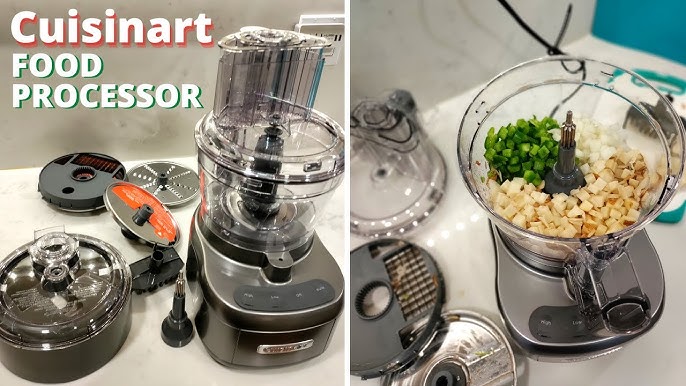
Before you start, it’s important to know the main parts of your Cuisinart food processor and how the slicer disk fits in. Most Cuisinart models—like the popular Cuisinart 14-Cup, Elemental Series, or Prep 9—use a similar system for attachments.
Main Components
- Work Bowl: The large clear container where food goes.
- Work Bowl Cover: The lid that locks in place and has a feed tube.
- Feed Tube and Pusher: Where you place food and use the pusher to guide it toward the blade.
- Stem Adapter (Detachable or Fixed): The part that holds the disk attachments in the center of the bowl.
- Metal Chopping/Mixing Blade: Used for chopping, not slicing.
- Slicing Disk: A flat, round metal disk with a sharp slicing edge.
- Slicing Disk Holder: Sometimes called the stem, this connects the disk to the motor shaft.
Not every model comes with the same disks. For slicing, the most common is the 4mm slicing disk for general use. Some models include adjustable or specialty slicing disks.
How The Slicing Disk Works
The slicing disk spins horizontally at high speed. As you push food through the feed tube, it meets the sharp edge and is cut into uniform slices. The slices then fall into the work bowl.
The disk sits on top of the bowl, not at the bottom like the chopping blade. This is a key difference that confuses many beginners.
Preparing The Food Processor For The Slicer
Getting clean, safe slices starts with proper preparation. Never rush this part—incorrect assembly can lead to poor results or damage.
Step 1: Unplug And Disassemble
Always unplug your food processor before attaching or removing any parts. This prevents accidental starts and keeps your hands safe.
Take off the work bowl cover, remove any blades or disks inside, and check that all parts are clean and dry. Water or food residue can make parts slippery or difficult to fit.
Step 2: Identify Your Disk And Adapter
Find the slicing disk and any required stem or disk adapter. Some models have a separate stem that clicks into the disk’s center hole; others have a fixed hub that fits directly onto the motor shaft.
Check your manual if you’re not sure which parts you need. Using the wrong disk can jam the machine or make uneven cuts.
Step 3: Prepare Food For Slicing
Wash and dry all items you’ll slice. Trim large vegetables or fruits to fit into the feed tube. For best results, cut items into even shapes—this helps the disk pull them through smoothly.
Step-by-step: Attaching The Slicer Disk
Attaching the slicer to your Cuisinart food processor is simple once you know the sequence. Here’s a detailed walkthrough.
Step 1: Place The Work Bowl On The Base
Set the work bowl onto the motor base. Align the handle and bowl grooves with the base, then twist until it locks. You should hear or feel a click. The bowl must be secure for the machine to work.
Step 2: Attach The Stem Adapter
If your model uses a stem adapter (sometimes called a detachable disk stem), fit it onto the motor shaft in the center of the bowl. Push down gently until it’s seated. The stem should not wobble or tilt.
Pro Tip: Some Cuisinart models, like the Custom 14, do not need a separate stem for the slicing disk. The disk fits directly onto the shaft. Check your manual or look at the disk’s center hole—if it matches the shaft size, you likely don’t need an adapter.
Step 3: Position The Slicing Disk
Hold the slicing disk by its plastic hub or edges—never touch the sharp metal edge.
If you’re using a stem, place the disk onto the stem until it clicks or feels firmly in place. If no stem is needed, align the disk’s center hole with the motor shaft and slide it down.
The disk will rest a short distance above the bowl’s bottom. Give it a gentle twist to ensure it’s seated; it should not spin freely or lift up.
Step 4: Secure The Lid And Feed Tube
Position the work bowl cover on top of the bowl. Align any arrows or tabs, then twist to lock. Insert the feed tube pusher into the feed tube. The machine usually won’t start unless all parts are locked.
At this point, the slicer is attached and ready to use.
Step 5: Double-check Safety
Check that:
- The bowl, lid, and pusher are locked.
- The disk is steady and does not rattle.
- The machine is still unplugged.
Now you can plug in the food processor and begin slicing.
Using The Slicer: Practical Tips For Success
Attaching the disk is just the start. For best results, you need to understand how to use the slicer attachment with different foods and settings.
Choosing The Right Slicing Disk
Cuisinart offers several slicing disks. The standard is 4mm (medium slice), but you may also have:
- 2mm Thin Slicing Disk: Good for cucumbers, onions, or salad greens.
- 6mm Thick Slicing Disk: Best for potatoes, firm cheeses, or tomatoes.
- Adjustable Slicing Disk: Lets you choose thickness (some premium models only).
Check the disk’s label, which often shows the thickness.
Loading Food Into The Feed Tube
For even slices:
- Stand food pieces upright in the feed tube.
- Pack the tube tightly (but not forced)—loose items may tilt or fall sideways.
- For smaller items, use the small inner tube insert for better control.
Example: To slice carrots, stack them vertically. For cucumbers, cut them to tube height for full circles.
Using The Pusher
Hold the pusher gently but firmly. Apply even, light pressure—let the disk do the cutting. Forcing food too hard may jam the disk or motor.
If the machine struggles, stop and check for blockages. Never use fingers or utensils in the feed tube while the machine is plugged in.
Slicing Soft Vs. Hard Foods
- Hard foods (carrots, potatoes): Chill slightly and slice at a steady pace.
- Soft foods (tomatoes, cheese): Use the thicker disk and pulse mode for control.
- Cooked meats: Chill in the fridge first for cleaner slices.
Cleaning Up
When finished, unplug the machine. Remove the lid, then carefully lift out the slicing disk by the hub (not the sharp edge). Wash all parts in warm, soapy water or on the top rack of the dishwasher. Dry thoroughly before reassembling or storing.

Credit: www.amazon.com
Slicer Attachment Vs. Other Disks
It’s easy to confuse the slicer disk with other attachments. Here’s a quick comparison.
| Attachment | Main Use | Shape of Result |
|---|---|---|
| Slicing Disk | Slicing vegetables, fruits, cheese | Flat, even slices |
| Shredding Disk | Grating cheese, carrots, cabbage | Fine or coarse shreds |
| Chopping Blade | Chopping, mixing, pureeing | Irregular pieces or purees |
Insight: Many beginners accidentally use the shredding disk when they want slices. Always check which disk you’ve installed before turning on the machine.
Common Mistakes And How To Avoid Them
Even experienced users make errors when attaching or using the slicer. Here’s how to avoid the most frequent problems.
Not Locking Parts Properly
If the bowl, lid, or disk isn’t locked, the machine may not start. Listen for clicks and look for alignment arrows.
Using The Wrong Disk
The slicer and shredder can look similar. Double-check the disk’s markings and shape.
Overloading The Feed Tube
Stuffing too much food at once leads to uneven slices or jams. Slice in batches for best results.
Touching The Blade Edge
The slicing disk is extremely sharp. Handle only by the hub or edges. Use a brush or dishwasher for cleaning, not bare hands.
Forcing The Food
Let the motor do the work. Forcing food can damage the disk or motor.
Non-obvious insight: Warm cheese or soft tomatoes will crush rather than slice. Chill them first for cleaner results.

Credit: us.amazon.com
Troubleshooting Slicer Attachment Issues
If your slicer isn’t working as expected, try these steps.
Disk Won’t Fit Or Attach
- Check if you need a stem adapter.
- Make sure no other blade is in place.
- Clean any food debris from the disk or shaft.
Food Isn’t Slicing Evenly
- Use the correct disk thickness.
- Pack the feed tube tightly.
- Use even pressure with the pusher.
Machine Won’t Start
- Confirm all parts are locked.
- Make sure the disk is seated flat.
- Check the power cord and outlet.
Disk Is Stuck
- Turn off and unplug the machine.
- Wiggle the disk gently by the hub, not the sharp edge.
- Avoid prying with tools, which can damage the disk or bowl.
Cleaning And Storing Your Slicer Attachment
Taking care of your slicer disk extends its life and keeps your slices clean and safe.
Washing Tips
- Wash the disk immediately after use to prevent food from drying on.
- Use a brush or dishwasher for the sharp edges.
- Dry thoroughly to avoid water spots or rust.
Storing Safely
- Keep the disk in a protective case or wrapped in a towel.
- Store all attachments together to avoid losing parts.
- Never place heavy items on top of the disk.
Maintenance
- Inspect the disk for nicks or dullness.
- Replace any disk that is bent, chipped, or dull.
- Check the stem adapter for cracks.
Practical Tip: If you slice sticky foods (like cheese), rub a drop of vegetable oil on the disk edge before slicing. This reduces sticking and makes cleanup easier.
Table: Food Slicing Recommendations By Disk Size
Here’s a quick reference for the best disk to use with common foods:
| Food | Best Disk Size | Notes |
|---|---|---|
| Carrots | 2mm or 4mm | Stand upright for full circles |
| Potatoes | 4mm or 6mm | Great for scalloped potatoes or chips |
| Tomatoes | 6mm | Chill first for cleaner slices |
| Cheese | 4mm or 6mm | Use cold, firm cheese |
| Onions | 2mm or 4mm | For salads or caramelizing |
| Apples | 4mm | Peel and core before slicing |
Why Use A Slicer Attachment? Key Benefits
You might wonder why you should use the slicer disk instead of a knife. Here’s what makes it a smart choice:
- Speed: Slice large quantities in seconds.
- Consistency: Every slice is the same thickness—important for even cooking.
- Safety: Less risk of cutting yourself than with a sharp knife.
- Versatility: Great for prepping salads, stir-fries, potato chips, and more.
Using the slicer also saves your hands from fatigue, especially with tough or slippery foods.
Real-world example: Preparing a big batch of scalloped potatoes by hand can take 20–30 minutes. With a food processor, it takes less than 5.
Credit: www.youtube.com
When Not To Use The Slicer Disk
While the slicer is great for many jobs, there are times it’s not the right tool.
- Very soft foods (ripe bananas, soft cheese): These can mush and clog the disk.
- Small, loose foods (peas, berries): They can fall through the disk or shoot out.
- Dicing or mincing: Use the chopping blade instead.
If in doubt, test a small amount first.
Non-obvious insight: For super-thin slices (like for garnishes), you may get better results with a mandoline or a very sharp knife.
Slicer Attachment Maintenance: How Long Will It Last?
With proper care, a Cuisinart slicer disk can last for years. Most users get 5–10 years of use before needing a replacement. However, if you use it daily or slice very hard foods, it may dull faster.
Signs it’s time to replace:
- Slices are uneven or ragged.
- The disk is warped or chipped.
- There’s visible rust or pitting.
Replacement disks are available from Cuisinart and many online retailers. Always buy genuine parts for best fit and safety.
Comparing Cuisinart Slicer To Other Brands
How does the Cuisinart slicer attachment compare to those from other brands like KitchenAid or Breville?
| Brand | Attachment System | Disk Variety | Ease of Use |
|---|---|---|---|
| Cuisinart | Stem or direct-fit disk | Wide range (thin, medium, thick, adjustable) | Simple, clear assembly |
| KitchenAid | Direct-fit with hub | Medium selection | Easy, but disks may be harder to remove |
| Breville | Direct-fit, adjustable disk | Adjustable disk standard | Intuitive but more expensive |
Cuisinart is known for reliability, easy-to-find parts, and value for money. For more technical comparisons, see the official Cuisinart support.
Safety Tips For Slicer Attachment Use
- Always unplug before attaching, removing, or cleaning parts.
- Never reach into the bowl or feed tube when the machine is plugged in.
- Handle the slicer disk with care—edges are razor-sharp.
- Use the pusher, not your fingers, to feed food.
- Store disks out of reach of children.
Frequently Asked Questions
How Do I Know Which Disk Is The Slicer?
The slicer disk is flat and has a single, sharp curved blade on one side. It may say “slicing” or “4mm” on the hub. The shredding disk, in contrast, has holes or grater-like edges.
Can I Use The Slicer Disk For Grating Cheese?
No, use the shredding disk for grating. The slicer disk will cut cheese into slices, not shreds. If you want shredded cheese for pizza or tacos, switch to the correct disk.
Why Won’t My Food Processor Start After I Attach The Slicer?
Most likely, one or more parts are not locked in place. Check that the work bowl, lid, and feed tube pusher are all clicked or twisted into their locked positions. The machine has safety sensors that prevent operation if anything is loose.
Is The Slicer Disk Dishwasher Safe?
Yes, most Cuisinart slicer disks are top-rack dishwasher safe. However, hand washing keeps the disk sharper and reduces wear on the hub. Always dry thoroughly to prevent rust.
What Foods Should I Avoid Slicing With The Disk?
Avoid very soft, sticky, or wet foods like bananas, overripe tomatoes, or soft cheese. These can mush and clog the disk. Also, don’t slice bones, frozen foods, or very hard seeds—they can damage the disk and machine.
Attaching the slicer to your Cuisinart food processor may seem tricky at first, but with practice, it becomes second nature. With the right setup, you’ll slice ingredients quickly, safely, and with results that rival any professional kitchen. Remember to handle the disk carefully, check parts before each use, and enjoy the versatility this attachment brings to your cooking.

Hello, This is Annie Walker, a 38-year-old blogger, founder, and editor of Cookware Guider from NY, USA. I am a cookware fanatic and passionate cooker. I love to cook with different types of cooking appliances (example: all types of cookware, rice cookers, slow cookers, etc) almost every day in my kitchen. I love to share my experience with my readers in my blog. Also, I enjoy helping people to solve their problems through my website. You can follow me on Twitter & Pinterest. To know details about my blog please check the about us page.