
Slicing food can be tricky if you don’t have the right tools. A Ninja Food Processor makes slicing fast, easy, and safe. Whether you’re preparing vegetables for a salad, slicing cheese for sandwiches, or making homemade potato chips, the Ninja Food Processor can help you get perfect slices every time. Many people feel unsure about how to use this machine for slicing, especially if they’re new to food processors. This guide walks you through everything you need to know, from setting up your Ninja Food Processor to getting consistent slices, avoiding common mistakes, and cleaning up afterward. You’ll also learn how to choose the right blade, use practical safety tips, and see real examples of slicing different foods. If you want to save time in the kitchen and make your meals look more professional, mastering slicing with your Ninja Food Processor is a great skill to have.
Understanding Your Ninja Food Processor
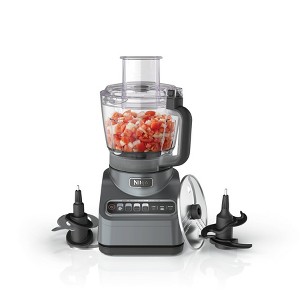
Before you start slicing, it’s important to know the basic parts of your Ninja Food Processor and what they do. Most Ninja Food Processors come with several attachments, including a slicing blade (sometimes called a disc), a bowl, and a lid with a feed chute. The slicing blade is designed to cut food into even slices.
The processor’s motor powers the blade, so you don’t need to use much force. The feed chute lets you add ingredients while the processor is running. Some models have adjustable slicing discs, so you can change the thickness of your slices.
Main Components
- Base/Motor: The main unit that powers the blades.
- Bowl: Holds the food you want to slice.
- Slicing Disc/Blade: The attachment used for slicing.
- Lid & Feed Chute: Keeps food inside and lets you add items safely.
Knowing these parts will help you set up and use the processor correctly.
Types Of Slicing Blades
Ninja Food Processors may have different slicing discs. Here’s a quick comparison:
| Blade Type | Best For | Slice Thickness |
|---|---|---|
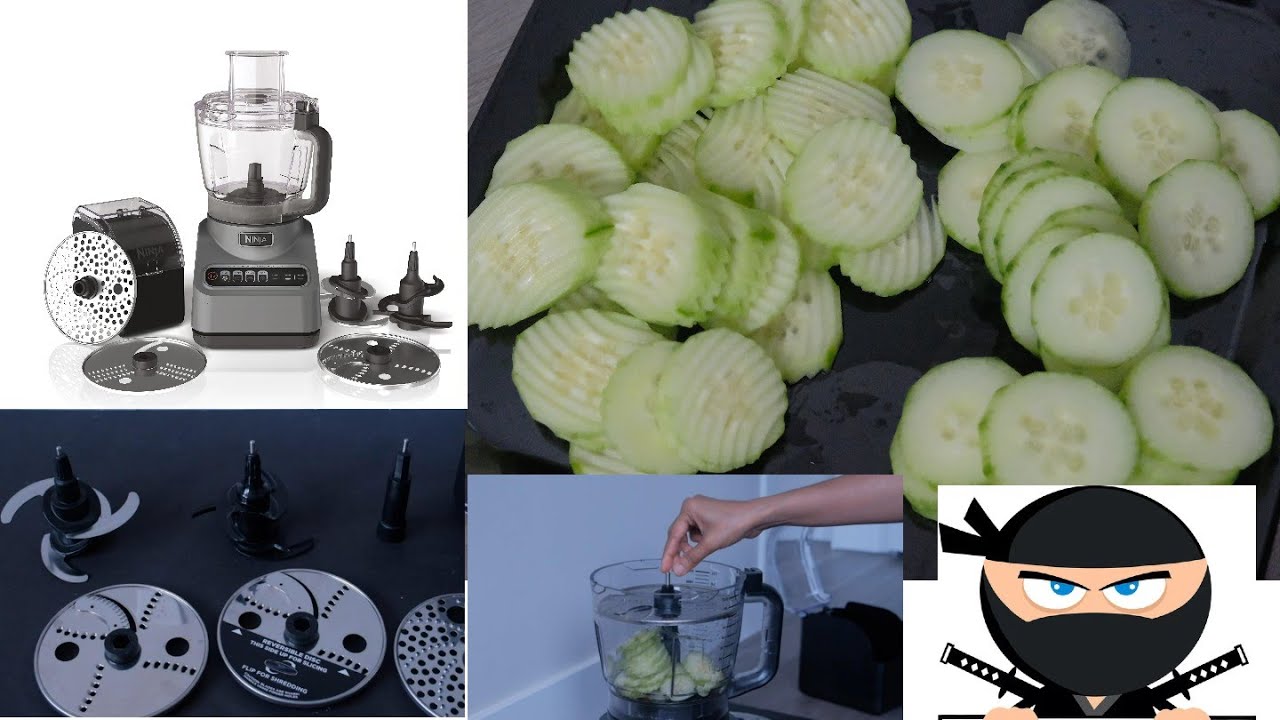
| Standard Slicing Disc | Vegetables, fruits | Medium |
| Adjustable Slicing Disc | Cheese, potatoes | Thin to thick |
| Julienne Disc | Carrots, celery | Matchstick |
If you’re not sure which blade to use, check your Ninja Food Processor manual. The standard slicing disc is the most common for everyday slicing.
Setting Up Your Ninja Food Processor
Proper setup is key for safe and efficient slicing. Follow these steps:
- Choose the right blade. For most slicing jobs, use the standard slicing disc.
- Assemble the processor. Place the bowl on the motor base, insert the slicing disc, and secure the lid.
- Check the feed chute. Make sure the chute is clear and the lid locks tightly.
- Prepare your ingredients. Wash and peel vegetables or fruits. Cut large items to fit the feed chute.
- Plug in the machine. Make sure your Ninja Food Processor is on a stable surface.
Example: Preparing Carrots
If you want to slice carrots, peel them first and cut them to about 3-4 inches long. This size fits most feed chutes. If you try to slice whole carrots that are too long, they can jam the processor or give uneven slices.
How To Slice With Ninja Food Processor: Step-by-step
Let’s break down the slicing process using a practical, easy-to-follow method:
1. Place Ingredients In The Feed Chute
After setting up the machine, put your prepared food into the feed chute. Don’t overfill—leave some space so food can move smoothly.
2. Select Slicing Speed
Most Ninja Food Processors have multiple speed settings. For softer foods like tomatoes, choose a low speed. For harder foods like potatoes, use a medium or high speed.
3. Use The Food Pusher
Always use the food pusher (the tool that comes with the processor) to gently press food down the chute. Never use your fingers.
4. Start Slicing
Turn the processor on. The blade will slice the food as it passes through. Move the food pusher slowly for thin, even slices. If you push too fast, slices may be uneven.
5. Collect Slices
The sliced food collects in the bowl. Stop the machine when you’ve finished slicing, and remove the bowl.
6. Check Slice Quality
Look at your slices. If they’re not the thickness you want, adjust the disc (if it’s adjustable) and try again with a new batch.
Example: Slicing Cucumbers
To slice cucumbers for a salad:
- Wash and trim the ends.
- Place one at a time in the feed chute.
- Use a low to medium speed.
- Push gently with the food pusher.
- Collect the slices and check for evenness.
Slicing Different Foods: Tips And Techniques
Not all foods slice the same way. Here’s how to handle some common foods:
Vegetables
Vegetables like carrots, cucumbers, and bell peppers are easy to slice if you cut them to fit the chute. For softer vegetables, chill them in the fridge first. Cold vegetables hold their shape better.
Fruits
Fruits such as apples, pears, or strawberries can be sliced, but remove seeds and stems first. For apples, cut them in half before placing them in the processor.
Cheese
Cheese works best if it’s firm and cold. Soft cheese can stick to the blade and make a mess. Try freezing softer cheeses for 10 minutes before slicing.
Potatoes
Potatoes need peeling and trimming. Use a high speed for slicing. For homemade chips, slice thinly and soak in water to remove starch before cooking.
| Food Type | Prep Needed | Recommended Speed |
|---|---|---|
| Carrots | Peel, cut to size | Medium |
| Tomatoes | Remove stem | Low |
| Cheese | Chill or freeze | Medium |
| Potatoes | Peel, soak | High |
Non-obvious Insight: Temperature Matters
Many beginners don’t realize that the temperature of the food affects slicing. Cold food slices more cleanly. If your slices look messy, try chilling the food before processing.
Non-obvious Insight: Slice Size Affects Cooking
The thickness of your slices can change cooking times. Thicker slices take longer to cook; thin slices may burn. Adjust slice thickness based on your recipe.
Common Mistakes And How To Avoid Them
Even with a Ninja Food Processor, mistakes happen. Here are some frequent errors and how to prevent them:
Overfilling The Feed Chute
If you put too much food in at once, slices can be uneven and the processor may jam. Only fill the chute with what fits comfortably.
Using The Wrong Blade
Using the wrong disc can ruin your slices. Always check which blade you need for your food.
Forgetting Safety
Never put your fingers near the blade or feed chute. Always use the food pusher. If food gets stuck, turn off the machine first.
Cutting Food Too Large
Large pieces won’t slice properly and can damage the blade. Cut food to the right size before slicing.
Slicing Soft Foods Warm
Warm, soft foods can stick to the blade and smear. Chill them first for better results.
Ignoring The Manual
Your Ninja Food Processor manual has important safety and setup tips. If you skip reading it, you may miss key steps.
Cleaning Up After Slicing
Cleaning is important for safety and keeping your processor working well. Here’s how to clean up:
- Unplug the machine. Always unplug before cleaning.
- Remove the bowl and blade. Take out the slicing disc carefully.
- Wash parts separately. Most Ninja Food Processor parts are dishwasher safe. Wash the bowl, lid, blade, and food pusher.
- Check the blade for stuck food. Use a brush if needed.
- Dry parts before storing. Let everything dry completely to prevent mold or rust.
Example: Cleaning After Slicing Cheese
Cheese can stick to the blade. Soak the blade in warm, soapy water for 10 minutes, then scrub gently with a brush.
Safety Tips For Slicing With Ninja Food Processor
Safety should always come first. Here are some key tips:
- Never touch the blade when the processor is plugged in.
- Use the food pusher—not your hands.
- Turn off and unplug before changing blades or clearing jams.
- Keep children away from the processor when it’s in use.
- Don’t force food through the chute. If food jams, stop and clear it safely.
Slicing For Meal Prep And Recipes
The Ninja Food Processor is perfect for meal prep. You can slice large amounts of food quickly and evenly. This helps you save time and makes your recipes look better.
Example: Slicing For Salad
If you’re preparing a salad for a family meal, slice cucumbers, bell peppers, and carrots in advance. Store the sliced vegetables in airtight containers in the fridge. They stay fresh and ready to use.
Example: Slicing For Stir-fry
For stir-fry, slice onions, peppers, and mushrooms. Uniform slices cook evenly, so your stir-fry turns out perfect.
Example: Slicing For Chips
Homemade potato chips need thin, even slices. Use the adjustable disc for thin slices, soak potatoes in water, then fry or bake.
Comparing Ninja Food Processor Slicing To Other Methods
Many people wonder how slicing with a Ninja Food Processor compares to other methods like hand slicing or using a mandoline. Here’s a practical comparison:
| Method | Speed | Consistency | Safety | Best For |
|---|---|---|---|---|
| Ninja Food Processor | Fast | Even | High (with pusher) | Large batches |
| Mandoline | Medium | Even | Medium (use guard) | Small batches |
| Hand Slicing | Slow | Varies | Low | Single items |
As you can see, the Ninja Food Processor is best for speed, safety, and consistency when slicing larger amounts.
Troubleshooting Slicing Problems
Sometimes things go wrong while slicing. Here’s how to fix common issues:
Uneven Slices
- Check if the blade is installed correctly.
- Use a steady speed and don’t force food.
- Make sure food is cut to fit the chute.
Food Sticking To Blade
- Chill or freeze soft foods before slicing.
- Clean the blade after every batch.
Processor Jamming
- Don’t overfill the feed chute.
- Slice tough foods in smaller pieces.
Blade Not Spinning
- Check if the bowl and lid are locked.
- Make sure the processor is plugged in.

Credit: www.amazon.com
Slicing For Special Diets
If you follow a special diet, slicing can help you prepare healthy meals faster. For example:
- Low-carb diets: Slice zucchini or eggplant for noodles.
- Vegetarian diets: Prepare sliced vegetables for salads, stir-fry, or veggie chips.
- Gluten-free diets: Use the processor to slice potatoes or sweet potatoes for gluten-free chips.
Slicing makes it easier to create fresh, homemade meals that fit your diet.
Advanced Slicing: Custom Thickness And Shapes
Some Ninja Food Processors have adjustable slicing discs. This lets you choose slice thickness or create shapes like julienne (matchstick cuts).
How To Adjust Thickness
- Look for a knob or lever on the slicing disc.
- Set it to your preferred thickness.
- Test with a small batch first.
Creating Different Shapes
- Use the julienne disc for thin strips.
- Try slicing carrots or potatoes for fries.
Credit: www.target.com
Caring For Your Slicing Disc
The slicing disc is a key part of your processor. Here’s how to care for it:
- Clean after every use. Food can dull the blade if left on.
- Avoid harsh scrubbers. Use a soft brush or sponge.
- Store safely. Keep the disc in a safe place to avoid bending or damage.
With good care, your slicing disc will last for years.
Real-life Examples: Slicing Success Stories
Many home cooks and professionals use the Ninja Food Processor for slicing. Here are some real-life examples:
Example 1: Saving Time With Meal Prep
A busy parent used their Ninja Food Processor to slice vegetables for a week’s worth of lunches. It took only 15 minutes to prepare enough sliced carrots, cucumbers, and bell peppers for five days. The slices were even and made packing lunches faster.
Example 2: Improving Recipe Quality
A chef used the processor to slice potatoes for gratin. The slices were perfectly thin and even, which helped the dish cook evenly and look professional.
Example 3: Making Homemade Chips
A home cook sliced sweet potatoes with the adjustable disc to make chips. The chips were crispy and tasted better than store-bought.
Credit: www.youtube.com
Ninja Food Processor Slicing: Key Benefits
Slicing with a Ninja Food Processor offers many advantages:
- Saves time: Fast slicing for meal prep.
- Consistent results: Even slices for better recipes.
- Safe to use: Food pusher and locked lid protect your hands.
- Versatile: Slices vegetables, fruits, cheese, and more.
- Easy cleanup: Dishwasher-safe parts.
If you want to make cooking easier, a Ninja Food Processor is a great investment.
Frequently Asked Questions
What Foods Can I Slice With My Ninja Food Processor?
You can slice vegetables (carrots, cucumbers, potatoes), fruits (apples, pears), cheese, and even some cooked meats. Always check your manual for specific recommendations.
How Do I Choose The Right Slicing Blade?
Check your processor’s manual. Use the standard slicing disc for most foods. For thin strips, use the julienne disc. For cheese or potatoes, choose a thicker setting.
Why Are My Slices Uneven?
Uneven slices can happen if the blade is not installed correctly, if you push food too fast, or if the food is too warm. Chill food and use a steady speed.
Can I Slice Soft Foods Like Tomatoes?
Yes, but use a low speed and chill tomatoes first. Soft foods slice better when cold.
How Do I Clean The Slicing Disc?
Remove the disc carefully, wash with warm, soapy water, and use a soft brush if needed. Let it dry completely before storing.
If you’d like to learn more about food processors in general, visit Wikipedia’s Food Processor page for detailed information.
Slicing with a Ninja Food Processor makes cooking faster and more enjoyable. With the right setup and techniques, you can create beautiful, even slices for any recipe. Remember to use the correct blade, prepare your food, and follow safety tips.
With practice, you’ll get perfect slices every time and make your kitchen experience easier and more fun.

Hello, This is Annie Walker, a 38-year-old blogger, founder, and editor of Cookware Guider from NY, USA. I am a cookware fanatic and passionate cooker. I love to cook with different types of cooking appliances (example: all types of cookware, rice cookers, slow cookers, etc) almost every day in my kitchen. I love to share my experience with my readers in my blog. Also, I enjoy helping people to solve their problems through my website. You can follow me on Twitter & Pinterest. To know details about my blog please check the about us page.